
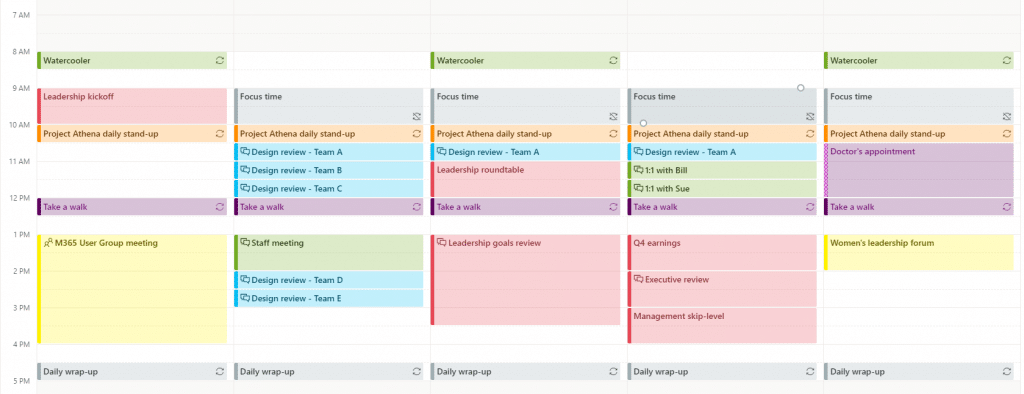
If you are a fan of Outlook, or simply must use it because it is part of your organization’s toolkit, you know that Outlook tasks are not automatically visible in the Calendar, which can make it difficult to track deadlines and manage your workload efficiently. Tasks are stored separately from calendar events, and unless manually added, they won’t appear alongside your appointments or meetings. This can create a disconnect when trying to view all your responsibilities in one place, leading to missed deadlines or poor time management. Integrating tasks into your calendar is essential for a more streamlined workflow and better visibility over your daily and long-term priorities.
What if you could bring everything into one cohesive view, visible across both Completix and Outlook?
That’s exactly what Completix does: by integrating tasks into a unified calendar that’s seamlessly synced between both platforms, you’ll have the ultimate tool to stay on top of your workload.
Completix’s powerful integration with Outlook lets you enjoy the best of both worlds—a unified calendar that shows all your tasks in both Completix and Outlook. Whether you prefer working directly in Outlook or within the Completix platform, your calendar stays synchronized, giving you a full view of all your meetings, appointments, and project tasks.
This means no more switching between platforms or manually adding tasks to your calendar. With this integration, your Outlook Calendar reflects everything you need to manage, while Completix provides the same calendar visibility within its project management environment.
The biggest advantage of this integration is the real-time synchronization between Completix and Outlook. Any task that’s created, updated, or completed in Completix is instantly reflected in your Outlook Calendar—and vice versa. If you modify a task in Outlook, it’s automatically updated in Completix, ensuring that both calendars always show the most up-to-date information.
This eliminates the risk of missing deadlines or working with outdated data. No matter which platform you’re using at the moment, you’ll have complete visibility into every task, milestone, and project deadline.
Whether you’re viewing tasks in Completix or Outlook, you can customize your calendar views to fit your needs. In Outlook, you might prefer to see tasks alongside meetings and appointments, while in Completix, you can filter tasks by project, priority, or due date.
This flexibility helps you stay organized and allows you to visualize your workload in the way that best suits you, no matter which platform you’re using.
With Completix and Outlook working in sync, you can foster better team collaboration. When team members are using different tools to manage their work, this integration ensures everyone is still working from the same playbook. A task created or updated in Completix by one team member will immediately appear in Outlook for another, enabling a seamless flow of information between platforms.
This integrated calendar reduces miscommunication, as everyone involved can access the most up-to-date task information, regardless of the platform they’re working on.
Another key benefit is that Completix integrates task reminders and alerts into both platforms. Automatic reminders will notify you in both Completix and Outlook when tasks are approaching their deadlines, keeping you on top of your schedule at all times.
These alerts ensure you never miss important deadlines, and with both systems working together, you won’t have to worry about juggling multiple platforms for updates.
Setting up the Completix and Outlook integration is quick and easy. With just a few steps, you can connect the two platforms, enabling real-time synchronization for your unified calendar.
Once connected, there’s no need for ongoing manual adjustments—the sync happens automatically, giving you more time to focus on delivering your projects, not managing your tools.

By integrating Completix with Outlook, you get a centralized view of all your tasks, appointments, and deadlines. This unified calendar eliminates the need to switch between platforms and ensures that you always have access to the most accurate, up-to-date information.
Whether you’re scheduling tasks in Completix or tracking your day in Outlook, this seamless integration helps you stay organized, productive, and ahead of every project.
With Completix’s integration into Outlook, managing your tasks has never been easier. By providing a unified calendar visible in both platforms, you gain the power to see all your tasks, deadlines, and appointments in one place, wherever you choose to work. The real-time updates, customizable views, and automatic reminders ensure that you stay in control of your projects and deliver results on time and within budget.
Ready to experience better task management? Start using Completix with Outlook today and unlock a new level of productivity and organization.