
01
Will it land on time?
A scheduler with task dependencies, milestones, the critical path, and baselines, so the timeline is something you control, not something you discover.
Completix organizes, summarizes, and surfaces everything happening across your project, so your time goes into steering delivery, not assembling the picture of it.
Status lives in your head and in a dozen tabs. You assemble the update by hand, find the overrun after it has already happened, and rebuild the same report every week before the meeting.
Schedule, budget, risks, and decisions stay current in one place. The Warning Centre watches for variance, and reporting is generated from live project data, so you steer instead of reconstruct.
You are not measured by how many tasks you assigned. You are measured by whether you can answer these, on demand and with confidence. Completix is built around them.
A scheduler with task dependencies, milestones, the critical path, and baselines, so the timeline is something you control, not something you discover.
Plan the budget, forecast across the lifecycle, and see budget against actuals as the project runs, so financial surprises stop being surprises.
Log risks, actions, issues, and decisions in one RAID register, while the Warning Centre watches your triggers and surfaces variance before it becomes a fire.
Status reports are generated from live project data, board ready, so the weekly update is a click, not an evening of copy and paste.
Change requests carry their approval, and a request that moves the timeline flags the schedule and updates the approved end date, with full schedule history behind it.
The document, the decision, the meeting note. A version controlled repository and a search that reaches across the whole project mean you never hunt for it twice.
Build the schedule with dependencies, milestones, and baselines, then watch the critical path. When the plan shifts, you see it on the chart, not in a status meeting three weeks later.
Plan the budget, forecast across the lifecycle, and compare it against actuals as work happens. When the forecast drifts past what was approved, the variance surfaces in the Warning Centre, not in a quarter-end reconciliation.
RAID is the project's memory. Score each risk by probability and impact, track actions through to done, and keep every issue and decision on the record, so nothing depends on who happens to remember it.
Each risk carries a probability and an impact that combine into a score and a Low, Medium, or High band, with key risks flagged. Open risks and issues link straight into your status report.
Set the triggers that matter on your project. When a threshold is crossed, on schedule, forecast, or a project rating, the item surfaces in the Warning Centre for you to act on. Nothing escalates on its own, and nothing stays buried.
Define the thresholds that matter, across schedule, budget, and project ratings.
When a threshold is crossed, the item appears in the Warning Centre, flagged by severity.
The Warning Centre raises the signal. The call on what to do next stays yours.
Completix builds the status report from the live project: health, schedule, and a written summary, with the open RAID items already linked in. You review and send, instead of stitching the same deck together every week before the meeting.
One platform for the whole project, so the work, the record, and the reporting never live in separate tools.
Move between Kanban boards and spreadsheet style grids for the same work.
Assign work, balance load against capacity, and plan effort over time.
Capture decisions and action items, tied to tasks and follow-ups.
Submit, approve, and assess impact, with the schedule flagged when a request moves dates.
Store and find project files with version control, integrated with external drives.
Find tasks, documents, and RAID items across the whole project at once.
Track contracts and expenses, and match quotes to invoices.
Report time against scheduled tasks, with entries pre-populated from effort.
Set reminders for tasks, deadlines, and the action items you cannot drop.
If you have outgrown Monday but cannot stomach an 18-month Planview rollout, Completix is built for exactly that gap.
| Capability | Completix | Monday / Asana | Planview / Clarity |
|---|---|---|---|
| Executive portfolio dashboards | Built-in, automated |
Manual, limited |
Complex setup |
| Time to first value | Days |
Days |
Months |
| Pricing & engagement model | Direct, no SI required |
Per-seat creep |
SI & license heavy |
| Stage-gate governance | Configurable |
Heavyweight |
|
| Governance workflow automation | Rule-based, auto-routed |
Config-heavy |
|
| Document sign-off & routing | Sign off in-platform |
Integrations only |
External tools |
| Resource capacity planning | Real-time |
Basic only |
|
| Automated risk early-warning | Trigger-based |
Partial |
Stop assembling the picture of the project and start steering it. Set up a project in Completix and see the schedule, budget, risks, and reporting come together in one place.
Does Completix allow me to manage both billable and non-billable projects?
Yes. Completix fully supports the classification and management of projects as either billable (for external clients, where hours and costs are invoiced) or non-billable (for internal initiatives, process improvements, training, or R&D activities). This distinction can be set directly when a project is created and maintained throughout its lifecycle.
How does Completix support the full project lifecycle better than Monday.com?
✅ Completix: Covers the entire project management lifecycle (PMLC), from planning and execution to monitoring and closure, including built-in risk management, financial tracking, and performance analysis.
❌ Monday.com: Focuses primarily on task and workflow management but lacks structured project lifecycle support, requiring additional tools for full PMLC execution.
Why is Completix better for complex project management compared to Wrike?
✅ Completix: Provides milestone tracking, workload balancing, predictive analytics, and structured workflows for managing complex projects efficiently.
❌ Wrike: Primarily focuses on simpler task and team management, lacking advanced forecasting and resource optimization tools.
Does Completix offer better budget and cost management than Planview?
✅ Yes! Completix has integrated budget tracking, cost forecasting, and financial reporting, allowing teams to manage project finances without external tools.
❌ Planview: Offers budget tracking, but requires complex configurations and separate financial integrations, making cost management less intuitive.
Why is Completix better for large teams than Monday.com or Asana?
✅ Completix: Scales effortlessly with multi-team project management, cross-department collaboration tools, and centralized dashboards for large organizations.
❌ Monday.com & Asana: More suited for smaller teams, and lack built-in enterprise-grade collaboration features without costly add-ons.
How does Completix handle workload management better than Monday.com?
✅ Completix: Provides advanced workload balancing, helping managers distribute tasks efficiently based on team capacity, priorities, and deadlines.
❌ Monday.com: Offers basic workload views, but lacks in-depth capacity planning and resource forecasting, making it harder to avoid team burnout.
What advanced features does Completix offer that Monday.com lacks?
✅ Completix: Includes milestone tracking, workload balancing, predictive analytics, detailed resource allocation, and customizable reporting to help teams stay on track.
❌ Monday.com: Focuses more on customizable workflows but lacks built-in workload forecasting, milestone tracking, and advanced reporting for complex project planning.
How does Completix provide better full-lifecycle project management than Planview?
✅ Completix: Supports the entire project lifecycle (PMLC) from strategic planning to execution, monitoring, and closure, with built-in risk management, financial tracking, and real-time insights.
❌ Planview: Primarily focuses on high-level portfolio management, but lacks execution-level tools for teams managing day-to-day project tasks.
Is Completix better for collaboration across teams?
✅ Yes! Completix enables end-to-end collaboration with cross-team dashboards, automated handoffs, and real-time communication tools, making execution smoother.
❌ Monday.com, Asana, and ClickUp: Focus primarily on individual task management, making cross-functional collaboration harder without extra setup.
How does Completix ensure project success better than Asana or ClickUp?
✅ Completix: Comes with a structured success framework, including pre-built templates, guided workflows, and AI-driven recommendations to keep projects on track.
❌ Asana & ClickUp: Provide templates, but lack a built-in project management methodology, leaving teams to figure out best practices themselves.
How does Completix automate project status reports better than ClickUp?
✅ Completix: Uses AI-powered automation to generate real-time status reports, progress updates, and stakeholder notifications, reducing manual work.
❌ ClickUp: Requires manual updates or Zapier integrations to automate reporting, making it more time-consuming.
Does Completix have better budget tracking than Monday.com or Asana?
✅ Yes! Completix has built-in budget management, allowing you to track costs, allocate resources, and analyze financial performance without needing third-party tools.
❌ Monday.com & Asana: Require external integrations like Harvest or QuickBooks to handle budgeting, adding extra costs and complexity.
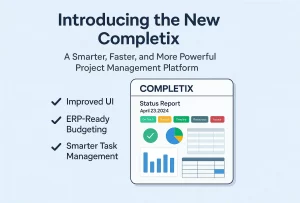
Coming Soon: The New Completix: Powerful, Flexible, and Beautifully Redesigned We’re excited to announce the upcoming release of the
What is a Project Schedule? A project schedule is the backbone of successful project management. It defines timelines, allocates resources,

5 Common Use Cases What are the 5 most common reasons for project failure? No project manager wants to see